
Banner Health
Banner HealthMedical
3.9985.00 Reviews
- Version
- 1.73
- Installs
- 100.00K
- Age Rating
- Everyone
Screenshots
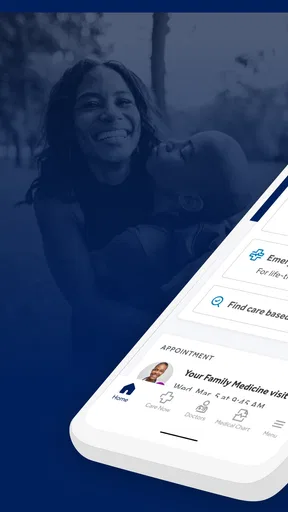
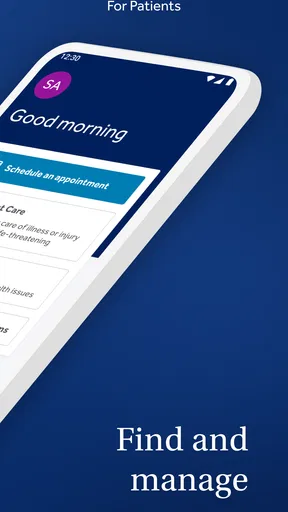
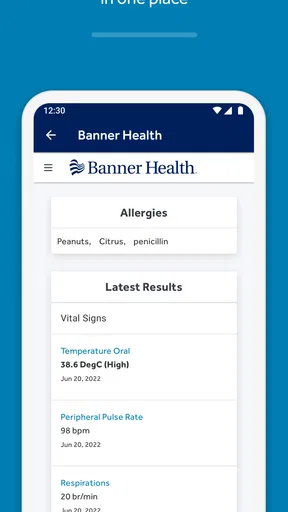
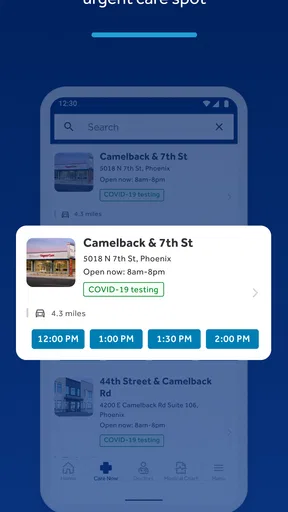
Our Review of Banner Health
 Analysis by Appyee
Banner Health is the kind of medical app I would keep installed for those moments when dealing with health care feels harder than it should. It comes from Banner Health, is free to use, and is intended for everyone rather than a narrow age group. In my experience, its value is less about replacing a conversation with a clinician and more about making ordinary health-care tasks easier to approach from a phone.
That distinction matters. A medical app can be useful without being a diagnostic tool, and I think this one makes the most sense when you already interact with Banner Health or want a mobile route into its services. The app has been available since January 17, 2019, and its current version is 1.73. With more than 100 thousand installs and a 3.9 average from roughly 2.2 thousand ratings, it has a real user base, although the rating also suggests that the experience will not feel perfect for everyone.
How Banner Health feels when your connection is doing the work
The first thing I notice with a health-care app is how dependent the experience is on a reliable connection. Banner Health is most useful when the phone can communicate with its online services, because the point of opening it is usually to reach current health-care information or complete a task that involves the provider. At home on a stable Wi-Fi connection, that relationship is easy to overlook. On mobile data, in a parking lot, inside a large medical building, or in a room with weak reception, it becomes much more obvious.
This changes how I use it. I would not wait until I am standing at a reception desk to install the app, sign in, or work out where the relevant section is. A better approach is to prepare while the connection is dependable. I can open the app before leaving home, check the route to the task I expect to perform, and make sure I know what information I may need. That small habit reduces the chance of turning a time-sensitive appointment into a phone-navigation problem.
Connectivity also affects confidence. When a screen loads slowly in a medical setting, I may wonder whether the issue is my phone, the building, or the service itself. That uncertainty is more frustrating in health care than in entertainment apps because I am usually trying to accomplish something practical. I find it helpful to pause rather than repeatedly tap buttons, especially when a request may take time to process. Repeated taps can make a person unsure whether an action was accepted.
The app is most dependable as a connected doorway to Banner Health, not as a substitute for urgent medical help. If I have a serious or rapidly worsening problem, I would contact emergency services or an appropriate medical professional instead of waiting for a mobile screen to respond. That is not a criticism of this particular app; it is the right boundary for almost every patient portal or provider app.
Why mobile access can be genuinely useful
A phone changes the setting in which health-care administration happens. I might remember a question while commuting, need to check something before an appointment, or want to handle a task without sitting at a desktop computer. The Banner Health app fits that pattern better than a traditional website when I already have my phone in hand and only a few minutes available.
One realistic example is preparing for a morning appointment. The night before, I could use the app while connected to home Wi-Fi, review the information relevant to my visit, and note anything I need to ask. On the way there, I would avoid relying on the app for last-second preparation if reception is uncertain. Instead, I would use the earlier session to reduce the number of decisions I need to make in the car or outside the clinic.
That workflow reveals an important trade-off: mobile access is convenient because it is close at hand, but convenience can encourage rushed use. Health information deserves more attention than a quick social-media check. I prefer to read carefully, verify that I am working in the right account or section, and avoid completing an important action while distracted. A larger computer screen may still be better for reviewing a long health history or entering detailed information.
The app is also a better fit for people who already feel comfortable managing routine tasks digitally. If you prefer speaking with staff for every step, or if you find account screens confusing, the app may add another layer rather than remove one. I would not recommend forcing yourself to use it simply because it is available. The best tool is the one that lets you complete the task accurately and with less stress.
What happens when a session fails
Health-care apps need a sensible recovery routine because interruptions are normal. A weak signal, an expired session, or a temporary service problem can leave me unsure whether I should start over. My practical rule is to first check whether the page has actually changed, then wait briefly, and only afterward retry. If I was submitting information, I would look for confirmation before pressing the same control again.
I also recommend keeping essential appointment details and contact information available through the normal channels you already use. That does not mean assuming the app lacks a particular capability; it means avoiding a single point of failure when the task matters. A phone call, a saved calendar entry, or a paper note can be useful companions during a visit. The app can handle the digital side while another method preserves the details you need if connectivity disappears.
When a problem continues, the most useful support conversation will include the practical context: whether you were on Wi-Fi or mobile data, whether the issue happened after signing in, and whether the same action failed more than once. I would avoid uninstalling immediately, because that can create unnecessary setup work and may not address a temporary connection issue. Updating the app to its current version, 1.73, is a sensible maintenance step before assuming the problem is permanent.
This is one area where a conventional browser or direct contact with Banner Health may be preferable. A browser can be easier on a larger screen, while staff can clarify an account or appointment issue that an app cannot explain. The app is useful when the mobile route is the shortest route; it is not automatically the best route for every failure.
Using it without wasting mobile data
Because medical tasks are usually short, I do not think data use should be a major obstacle for most people, but I still prefer to be deliberate. I would open the app on Wi-Fi when possible, especially before a planned appointment or when I expect to review several screens. That gives the app a chance to load without using mobile data and lets me concentrate on the information rather than the signal indicator.
For people with limited data plans, the useful habit is not to leave the app open in the background while waiting. I would launch it when I am ready, complete one task, and close it rather than repeatedly refreshing. If a screen seems stuck, refreshing over and over is unlikely to improve a poor connection and may consume more data than a patient retry after moving to a stronger signal.
Privacy is part of data-conscious use too. I would avoid opening personal health information on a shared device or while connected to a network I do not trust. A phone screen can be visible to people nearby, particularly in waiting rooms. I would also take a moment to lock the phone when finished. These are simple habits, but they matter more for a medical app than they do for many ordinary shopping or entertainment apps.
Another useful trade-off is deciding when typing on a phone is worth it. Short notes and quick checks are comfortable. Long explanations, careful reviews, or anything that requires comparing several details are less pleasant on a small screen. In those cases, I would choose a computer or contact Banner Health directly if the matter is important enough that a typing mistake could cause confusion.
Who will get the most from Banner Health
I see the strongest fit for current Banner Health patients who want a convenient mobile connection to their health-care organization. It can make routine digital interaction feel more immediate than searching through a website every time. It is also a reasonable option for family members who help someone manage appointments or health-care administration, provided the account and privacy arrangements are handled appropriately.
The free price removes an obvious barrier, and the Everyone content rating makes the app broadly approachable. Still, free does not mean effortless. Users may need patience with sign-in steps, network interruptions, or the limits of a phone-sized interface. The 3.9 average rating is fair evidence that the app is useful to many people while leaving room for friction. I would treat it as a practical service tool rather than an especially polished all-purpose medical companion.
I would skip it if I am looking for symptom diagnosis, medication coaching, fitness tracking, or a general health encyclopedia. Those are different jobs. A provider app is valuable because it connects me with a particular health-care system, while a general medical reference may be better for learning about a condition. Even then, online information should not be mistaken for personal medical advice.
I would also hesitate if I rarely use Banner Health or do not have a reason to manage care through that organization. Installing a provider-specific app without a corresponding need can create clutter without adding value. In that situation, a general health app or the provider’s usual phone support may be more suitable.
How it compares with a browser, phone call, or paper notes
Compared with a mobile browser, the app has the advantage of being a dedicated place for Banner Health tasks. I do not have to begin with a web search, and the phone-based format is convenient when I am away from a computer. The browser still wins when I need a larger view, when I am using a shared computer temporarily, or when I do not want another installed app.
Compared with a phone call, the app can be more convenient for routine matters that do not require a conversation. A call remains better when I need clarification, when something appears incorrect, or when the situation is urgent or emotionally difficult. Speaking with a person can prevent misunderstandings that are easy to miss in a sequence of small mobile screens.
Compared with paper notes, the app is better for connected digital access, while paper is more resilient when the battery is low or reception is poor. I would use both strategically: keep the app for current digital tasks, and keep essential visit details in a calendar or note that I can access without depending on a live session. That is not redundancy for its own sake; it is a sensible response to the way connectivity can fail at inconvenient times.
Small habits that make the experience smoother
I would begin by installing and opening the app before I actually need it. That gives me time to become familiar with its layout and resolve any account-related steps while I am calm. Medical technology is easier to use when it is not being learned in the middle of an appointment.
Next, I would use a two-stage routine: prepare on a dependable connection, then use the phone for the smallest necessary action while traveling or waiting. This reduces the impact of weak reception and helps prevent rushed decisions. It is especially useful for anyone who has a limited data plan or regularly visits buildings where signals are inconsistent.
Finally, I would treat every confirmation screen as important. After completing an action, I would look for a clear indication that it went through and keep a note of anything that needs follow-up. If the result is unclear, I would not assume success merely because the button responded. That cautious approach is more valuable in a medical setting than speed.
Banner Health is developed by Banner Health and has reached over 100 thousand installs, which gives it a meaningful place among provider-focused health apps. Its 985 reviews and roughly 2.2 thousand ratings point to an experience that is useful but not universally smooth. Those figures matter less to me than the practical question of fit: do I need a mobile connection to Banner Health, and am I comfortable having a browser-like, network-dependent task on my phone?
My final view is positive but measured. I would recommend it to a Banner Health patient who wants easier mobile access and is willing to prepare for the moments when connectivity is weak. I would not present it as an emergency tool, a diagnostic service, or a replacement for staff. Its real strength is convenience in ordinary care management; its main weakness is that convenience depends on a working connection and a user who knows when to switch to another channel.
For the right patient, Banner Health is a useful digital front door, provided the phone is treated as one part of a wider care routine rather than the only way in. That balance is what makes the app worth keeping: it can remove small obstacles from everyday health care, while good judgment still determines when a call, a computer, or direct medical attention is the better choice.
Verdict
Strengths of Banner Health
- Easy access to appointments, test results, and health records.
- Secure messaging makes contacting care teams convenient.
- Prescription refill requests can be handled within the app.
- Virtual care options reduce the need for some in-person visits.
- Health information is organized in one accessible place.
Limitations of Banner Health
- Some features may require an active Banner Health account.
- Availability of services can vary by location and provider.
- Appointment slots may be limited during busy periods.
- Users may experience occasional login or loading issues.
- The app is most useful for patients within the Banner Health network.
Similar Picks in This Category
View All
WebMD: Symptom Checker
WebMD, LLC4.1

Microphone Amplifier
DOSA Apps4.2

Anatomy Learning - 3D Anatomy
3D Medical OU4.5

Period Tracker and Calendar
SimpleInnovation4.9

GoodRx: Prescription Coupons
GoodRx4.8

CVS Health
CVS Pharmacy4.5
Frequently Asked Questions
What is Banner Health, and what can I do with the app?
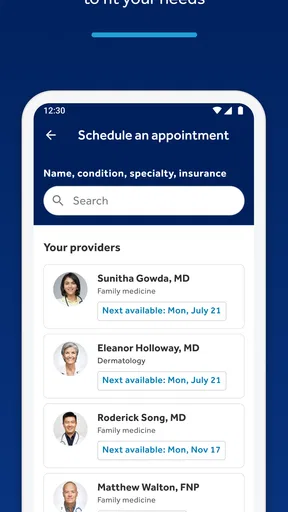
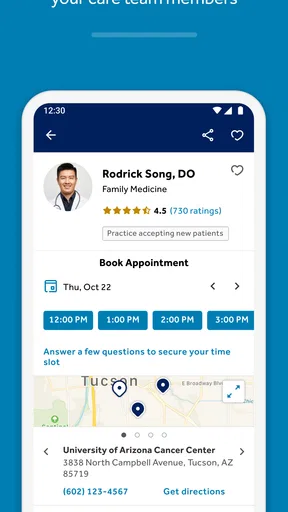
Banner Health is the official mobile app for patients using Banner Health services. After signing in, you can typically view upcoming appointments, request or manage visits, review parts of your medical record, check test results, message your care team, request prescription refills, and access billing information. Available tools may depend on your location, provider, and the Banner services connected to your account.
How do I sign in to the Banner Health app?
You generally sign in with your Banner Health patient portal credentials, often associated with MyBanner Patient Portal. New users may be able to create an account or activate access using information provided by Banner Health. Make sure your personal details match your medical records. If you forget your password or cannot verify your identity, use the recovery options in the app or contact Banner Health support.
Can I schedule appointments and communicate with my doctor through Banner Health?
The app can make routine healthcare administration more convenient by allowing eligible patients to view, request, or manage appointments. It may also provide secure messaging with participating physicians, nurses, or clinic staff. However, not every appointment type or provider supports online scheduling and messaging. Response times can vary, so urgent medical concerns should never be handled through the app.
Does Banner Health show test results, prescriptions, and medical records?
Depending on your account and the Banner Health facility providing care, the app may display laboratory results, visit summaries, medications, allergies, immunizations, and other portions of your electronic health record. Some results may appear only after a review period or may not be available digitally. The app is useful for organizing information, but it should not replace advice from your healthcare professional.
Is the Banner Health app safe to use, and is it free?
The Banner Health app is generally available at no additional charge, although normal mobile data charges may apply. It is designed to provide secure access to personal health information, so you should use a strong password, enable device security, and avoid signing in on shared or public devices. Download it only from the official Google Play Store or Apple App Store, and keep it updated.
